How to Text When Cell Towers Are Down
Hurricanes, earthquakes, wildfires, and blackouts all take cell networks with them. Here is a practical, layered plan for staying in touch when the grid fails — and an honest account of what each tool can and cannot do.
Why phones fail in disasters
Cell networks fail in disasters for three reasons: towers lose power or are physically damaged, backhaul links to the wider internet are cut, and the towers that survive are overwhelmed by everyone calling at once. After major hurricanes, counties have reported a large share of cell sites down for days. Your phone isn't broken — the infrastructure it depends on is.
The four layers of emergency communication
No single tool covers every scenario. Emergency managers think in layers, and so should you:
- Official alerts (receive-only): Wireless Emergency Alerts and NOAA weather radio keep working when data networks are congested. Keep WEA enabled in your phone settings.
- Satellite (anywhere, sky view required): iPhone 14 and later support Emergency SOS via satellite, and newer iOS versions add satellite texting to regular contacts. Dedicated devices like Garmin inReach work on any phone but need a subscription. Satellite is your link to the outside world.
- Radio (miles, hardware required): FRS walkie-talkies (no license, ~1-2 miles in practice) and GMRS radios (license required in the US, more power) are reliable for voice within a neighborhood or convoy.
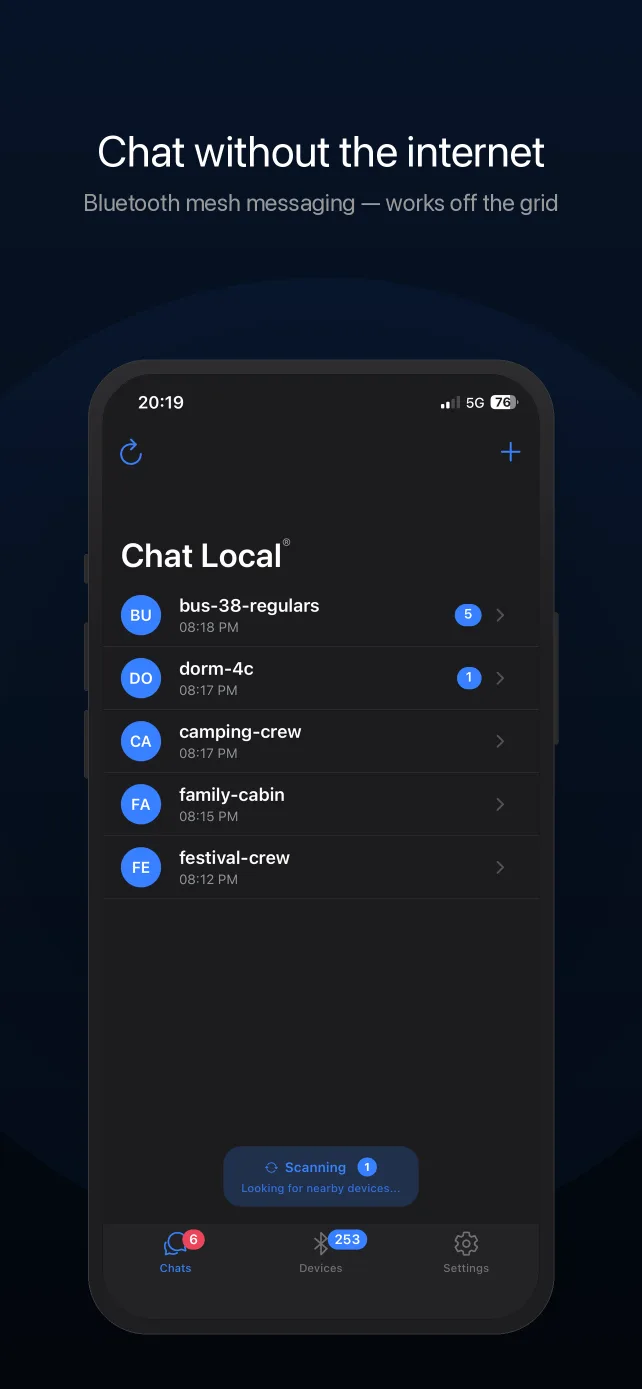
- Bluetooth mesh (your immediate group, no hardware): apps like Chat Local turn the phones people already carry into a local text network — no towers, no internet, no extra gear. This is the layer for coordinating with family, neighbors, a shelter, or a search party.
Where Chat Local fits — honestly
Chat Local sends encrypted text messages directly between iPhones over Bluetooth. Direct range is typically 10-30 meters (up to ~100 m with clear line of sight), and messages relay through up to 5 intermediate devices, so coverage grows with every person who has the app. It works in airplane mode, needs no account, and stores messages only on the phones involved.
What it is not: a way to reach 911, anyone outside Bluetooth/mesh range, or Android phones (it is currently iPhone-only). Use it as your group-coordination layer alongside — not instead of — official alerts and satellite SOS.
Prepare before the disaster
- Install ahead of time. App stores need internet. Get every family member's phone set up while networks are healthy.
- Create your household conversation now and send a test message, so nobody is learning the app by flashlight.
- Battery discipline: airplane mode + Bluetooth makes your battery last dramatically longer when towers are down, because the phone stops hunting for signal. Chat Local works normally in this mode. Keep a charged power bank with your kit.
- Agree on fallbacks: a rally point and check-in times in case phones die entirely. Paper beats batteries at hour 72.
What Chat Local costs
Chat Local is free to download and use: Bluetooth mesh messaging (50-character messages), default AES-256-GCM encryption, 2 conversations, and a 20-message history cost nothing. Pro — $4.99/month or $29.99/year with a 7-day free trial, or $59.99 once for lifetime access — adds unlimited conversations, 400-character messages, password-protected end-to-end encryption, custom themes, and faster sending.
Chat Local is a coordination tool, not a safety service. It cannot contact emergency services. In an emergency, call 911 when any network is available.
Frequently Asked Questions
How can I text someone if cell towers are down?
You have four realistic options: (1) Bluetooth mesh apps like Chat Local for people within your immediate area — no infrastructure needed at all; (2) satellite messaging — iPhone 14 and later can text emergency services and, on recent iOS versions, regular contacts via satellite with a clear view of the sky; (3) dedicated satellite messengers like Garmin inReach (subscription required); (4) two-way radios (FRS/GMRS). Each covers a different distance: mesh covers your neighborhood/group, satellite reaches anywhere, radios cover a few miles.
Does Chat Local work when the power grid is down?
Yes, as long as the phones themselves have battery. Chat Local needs no cell towers, no internet, no WiFi, and no servers — messages travel directly between phones over Bluetooth and can relay through up to 5 intermediate devices. Pair it with a charged power bank as part of your emergency kit.
Can Chat Local call 911 or reach emergency services?
No. Chat Local only reaches other nearby Chat Local users — it cannot contact emergency services, and it is not a substitute for 911, Wireless Emergency Alerts, or satellite SOS. Use it to coordinate with family, neighbors, and your group when networks are congested or down.
What is the best way to prepare my family's phones for a disaster?
Install an offline mesh app (everyone needs the same one), download offline maps of your area, agree on a household rally point, keep power banks charged, and learn how to enable your phone's emergency satellite features if it has them. Do all of this before you need it — app stores don't work without internet.
How far does Bluetooth mesh reach in an emergency?
Direct Bluetooth range is typically 10-30 meters in real-world conditions, up to about 100 meters with clear line of sight. Chat Local extends this by relaying messages through up to 5 intermediate devices, so a street or shelter with multiple users forms a larger network. It is neighborhood-scale communication, not city-scale.
Set It Up Before You Need It
Chat Local is free on the App Store. Download it while you still have signal.