A Family Emergency Communication Plan That Survives the Network Going Down
Most family emergency plans stop at "call each other" — which is exactly the thing that fails first. Here is a complete plan you can fill in tonight: contacts, rally points, check-in rules, and communication layers that keep working when the towers don’t.
Why plans fail: they assume the network
In a real emergency the cell network is the least reliable thing you own — jammed by call volume in the first hour, degrading as tower batteries die, gone in a regional event. A plan whose every step begins with "call" or "text" has a single point of failure. The fix isn't exotic gear; it's deciding in advance what you'll use when each layer fails, and writing it down on paper.
The plan — six parts, one evening
- Contact card (paper, one per person). Names, phone numbers, and addresses for the household, plus your out-of-area contact. Wallet, backpack, glovebox. Phones die; paper doesn't.
- Out-of-area contact. A relative or friend far enough away to be outside your disaster. Everyone who can get any message out reports to them; they relay. Local circuits jam while long-distance often survives.
- Two rally points. One near home (the neighbor's porch, the corner mailbox) for house-scale events; one outside the neighborhood (a library, a relative's house) for evacuations. Agree on both now.
- Check-in rules. Who checks in, to whom, and when — e.g. "on the hour, every hour, until everyone is accounted for." A missed check-in is a signal, not an annoyance.
- Communication layers (your PACE plan):
- Primary: normal calls and texts, while they work.
- Alternate: offline messaging — Chat Local sends encrypted texts phone-to-phone over Bluetooth with no towers or internet, and relays through up to 5 devices. This is the layer for everyone within the house, street, convoy, or shelter.
- Contingency: FRS/GMRS radios for voice at miles of range, if you own them. Satellite (iPhone 14+ Emergency SOS, Garmin inReach) to reach the outside world.
- Emergency: written notes at the rally point, and the rally point itself.
- A practice date. Put the first drill on the calendar before you put the plan in a drawer.
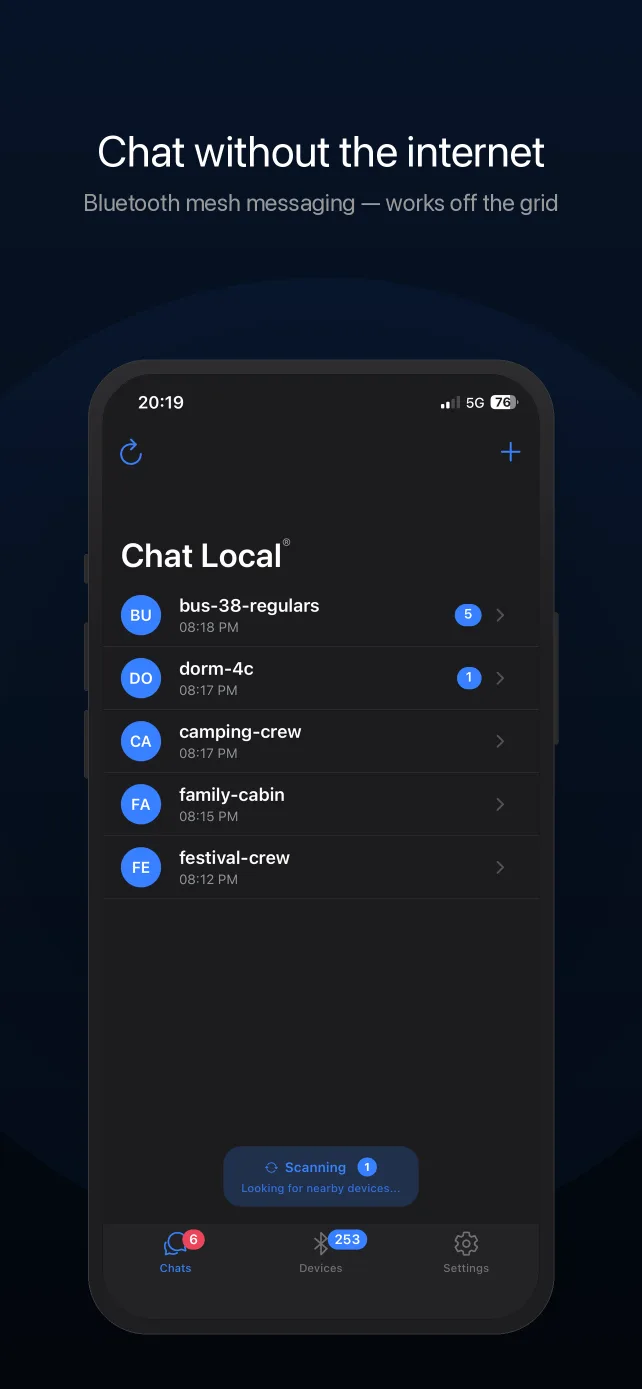
Set up the offline layer tonight
- Install Chat Local on every family iPhone (needs internet once — do it now, not during the event).
- Create the family conversation. Add a password if you want end-to-end encryption (Pro) — the app shows a lock on every message that's actually encrypted.
- Write the conversation name and password into the paper plan.
- Send a test message and check the delivery confirmation — each message reports whether nearby devices actually received it, so the drill proves the setup.
Drill it: the 15-minute no-network test
Everyone puts their phone in airplane mode and turns Bluetooth back on. Send check-ins over Chat Local from different rooms, then from across the street. Watch the delivery status under each message. Note where coverage ends — that's your real mesh footprint, and it grows with every phone added. Then review the paper card: can everyone name both rally points and the out-of-area contact from memory?
Deeper background reading: the grid-down communication guide (layered comms for preppers) and communicating during a power outage.
What it costs
Chat Local is free to download and use: Bluetooth mesh messaging (50-character messages), default AES-256-GCM encryption, delivery confirmations, 2 conversations, and a 20-message history cost nothing. Pro — $4.99/month or $29.99/year, or $59.99 once for lifetime access — adds unlimited conversations, 400-character messages, password-protected end-to-end encryption, message search, chat export, themes and backgrounds, and faster sending.
Frequently Asked Questions
What should a family emergency communication plan include?
Five things: a wallet-card contact list (including an out-of-area contact), two rally points (near home and out of neighborhood), a check-in schedule, the communication layers you'll use in order (normal calls/texts, then offline messaging like Chat Local, then radio or satellite if you have them), and a practice date. Written on paper — phones die.
Why do I need an out-of-area contact?
Local networks jam in a disaster while long-distance routes often still work — and family members who can't reach each other can often each reach a relative two states away. Everyone reports to the same out-of-area person, who relays. It's a decades-old emergency management practice that still holds.
What is a PACE plan?
Primary, Alternate, Contingency, Emergency — a military-origin planning method: decide in advance four ways to communicate, in order. For a family it might be: (P) normal calls and texts, (A) Chat Local over Bluetooth for everyone nearby, (C) FRS/GMRS radio for distance, (E) written notes at the rally point. When one layer fails you drop to the next without discussion.
How does offline messaging fit into a family emergency plan?
It's the layer for when networks fail but people are within reach — the house, the neighborhood, the evacuation convoy, the shelter. Chat Local needs no infrastructure: messages travel phone-to-phone over Bluetooth and relay through up to 5 devices. Install it on every family iPhone while networks are healthy, put the conversation name in the written plan, and include it in your drills.
How often should we practice the plan?
Twice a year, tied to something you already do (clock changes work). A useful drill is cheap: everyone into airplane mode with Bluetooth on, send check-ins over Chat Local, watch the delivery confirmations, and walk (or describe) the route to the rally point. A plan that's never been run is a document, not a capability.
Does it work with my phone locked or in my pocket?
Yes. Chat Local keeps looking for nearby devices and reconnecting to them while the app is backgrounded and the screen is off, so messages keep arriving with the phone pocketed. Keep Bluetooth enabled and don't force-quit the app; background delivery can be slightly less immediate than with the app open on screen.
How do I know whether my message actually got through?
Every message you send reports its real status underneath it: sending, sent, or received by the number of nearby devices that confirmed it — including devices reached by mesh relay. If nobody was in range, it says the message wasn't delivered instead of showing a false success.
Should I send sensitive information over Chat Local?
Use the right tier. Chat Local has two levels of encryption: default encryption (AES-256-GCM with keys built into the app) protects every message from passive radio eavesdropping, but like any built-in scheme it should be treated as strong obfuscation rather than secrecy — assume a determined attacker with the app could read default-tier messages. For anything sensitive, use a password-protected conversation (Pro): the key is derived from your password, only people who know it can read the messages — even relaying phones can't — and the app marks each message that was actually sent encrypted with a lock icon. Also know what is visible regardless: conversation names and sender display names are broadcast to nearby app users by design (that's how nearby discovery works), and Bluetooth transmissions are detectable as radio activity. Name conversations accordingly.
Set It Up Before You Need It
Chat Local is free on the App Store. Download it while you still have signal.